The 12 Best Wedding Planning Apps and Tools for 2027

Search "wedding planning app" and you'll find dozens of options that each claim to do everything. None of them really does. The couples with the calmest planning use a handful of tools, and each tool does one job well.
So this list is organized by job. For each part of planning, we picked the tool we'd use ourselves and explained why. A few of these are made by us (we're the team behind ReplayMyDay, Text My Wedding, and Text My Event), and we've labeled them. The rest are the tools couples use most for good reason.
Quick picks
| The job | Our pick | Why |
|---|---|---|
| Texting your guests | Text My Wedding | Private group texts, scheduled reminders, and every reply in one inbox |
| Wedding website and RSVPs | Zola or Joy | Free, polished websites with built-in RSVP forms |
| Finding and booking vendors | The Knot | The largest marketplace of vendor reviews |
| Registry | Zola | One registry that mixes stores, experiences, and cash funds |
| Guest list | Google Sheets + our free Guest List Manager | One master list everything else can import from |
| Budget | Our free Wedding Budget Calculator | Realistic category splits in a minute |
| Seating chart | Our free Seating Chart Planner | Assign guests to tables without a subscription |
| Day-of timeline | Our free Wedding Timeline Generator | A shareable minute-by-minute schedule |
| Inspiration | Still the best place to build a visual direction | |
| Stationery and signs | Canva | Easy DIY signage, menus, and programs |
| Music | Spotify + our Wedding Playlist Builder | Collaborative playlists your DJ can work from |
| Guest photos and videos | ReplayMyDay | One QR code, every guest's photos in one gallery |
1. Text My Wedding: best for guest communication
Made by our team.
Your guests will forget the shuttle time. They'll lose the invitation. They won't check the wedding website the morning of. But they will read a text.
Text My Wedding lets you text your whole guest list at once. Each guest gets the message as a private text. There's no group chat, nobody sees anyone else's number, and there's no reply-all. Replies come back to one inbox that you, your partner, and your planner can all read.
Use it for:
- Save-the-dates and digital invitations (designing them is free)
- RSVP reminders sent only to the guests who haven't answered
- Hotel block deadlines, dress code reminders, and registry links
- Day-of logistics: shuttle times, parking, a weather change, the after-party address
- A thank-you text the morning after, with a link to the photos
Why it wins this category: You can write every message months ahead and schedule it. You can also text just one group, like the wedding party, out-of-town guests, or the people on the 4:15 shuttle. If your guest list is already in The Knot, Zola, or Joy, you can import it instead of retyping it.
Price: Plans start at $19, paid once per wedding with no subscription. You can try it free by texting yourself first.
2. Zola: best all-in-one website and registry
Zola gives you a free wedding website, a registry, and guest list tools in one account. The website templates match Zola's invitation designs, which keeps everything looking consistent. The registry lets you combine items from different stores, experiences, and cash funds on one page.
Use it for: your wedding website, online RSVPs, and your registry.
Pair it with: texts. A website is where guests look things up. A text is how you tell them something changed. Put the full details on Zola, then send guests a text with the link when it matters.
3. Joy: best free wedding website with a guest app
Joy (also called WithJoy) offers free wedding websites with clean designs. It also has a guest-facing app, which works well when you have a multi-day schedule like a welcome dinner, the ceremony, and a farewell brunch.
Use it for: a website with a detailed schedule, and RSVPs for multiple events.
Keep in mind: Not every guest will download an app. Grandparents and casual acquaintances are the least likely to. Text the most important updates too, so everyone gets them.
4. The Knot: best for finding vendors
The Knot has the largest collection of vendor listings and reviews. If you're searching for a photographer, florist, DJ, or venue in a new city, start there. It also offers websites and a registry, but its marketplace is the reason to use it.
Use it for: comparing vendors and reading reviews. When you're choosing a photographer, our guide on how to choose a wedding photographer lists the questions to ask.
5. Google Sheets: best master guest list
This one sounds boring, but it's the most important tool on the list. One shared spreadsheet with names, phone numbers, mailing addresses, households, meal choices, and RSVP status becomes the source for everything else. Your website, texting tool, seating chart, and caterer counts all start from it.
Use it for: keeping one source of truth. Collect phone numbers along with mailing addresses from the start. Text My Wedding explains how to collect addresses for your wedding without chasing people one by one.
Free alternative: Our Guest List Manager tracks plus-ones and RSVP status without any setup.
6. Wedding Budget Calculator: best quick budget
Made by our team.
Budget apps tend to be either too simple or too complicated. Our free Wedding Budget Calculator splits your total into realistic category amounts for venue, catering, photography, attire, and more. That way you know what "reasonable" means before you talk to vendors.
7. Seating Chart Planner: best free seating tool
Made by our team.
Seating charts are where wedding planning gets political. Our Seating Chart Planner lets you assign guests to tables and move them around as often as you need, with no subscription.
8. Wedding Timeline Generator: best day-of schedule
Made by our team.
Your photographer, DJ, planner, and wedding party all need the same schedule. The Wedding Timeline Generator builds a minute-by-minute day-of timeline from your ceremony time. Once it's done, send the relevant parts to the people who need them. A text to the wedding party saying "Photos at 3:30 by the barn" saves a lot of searching.
9. Pinterest: best for inspiration
Pinterest is still the best place to work out what you actually like. Make one board per category, like florals, tablescapes, attire, and signage, and share them with your vendors. A board is often clearer than a description.
10. Canva: best for DIY stationery and signs
Welcome signs, menus, programs, table numbers, and the QR code sign for your photo gallery are all easy to make in Canva. Use one font pairing and one palette across everything so the day looks consistent.
11. Spotify: best for the playlist
Start a collaborative playlist and share it with your partner, then with the wedding party. Our Wedding Playlist Builder suggests songs for each part of the day, from the processional to cocktail hour. It gives your DJ or band a clear starting point.
12. ReplayMyDay: best for collecting guest photos
That's us.
Your photographer captures the posed and planned moments. Your guests capture everything else: the dance floor at 11pm, the grandparents' table, the getting-ready chaos. ReplayMyDay collects all of those photos and videos in one gallery. Guests scan a QR code, upload from their phone's browser, and don't need an app or account.
Tip: Put the QR code on table signs, then send it again by text the morning after. Plenty of guests don't upload until they're home and looking through their camera roll.
How the pieces fit together
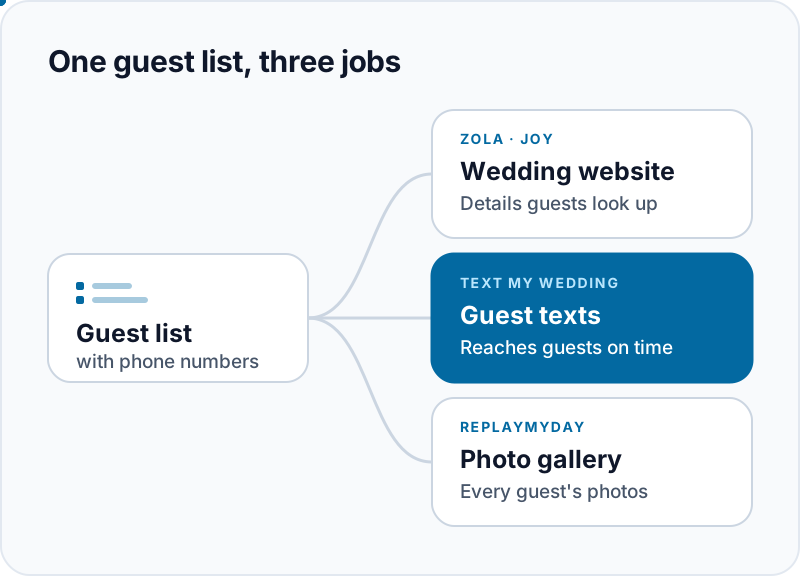
If you only use three tools, use these:
- A wedding website (Zola or Joy) holds the details guests look up.
- A guest texting tool (Text My Wedding) tells guests when to look, and reaches them when plans change.
- A photo gallery (ReplayMyDay) collects what everyone captured.
Everything starts from one clean guest list with phone numbers. Get that right early, and the rest of these tools are easy to set up.
Frequently asked questions
Is there one app that does everything for a wedding?
Not one that does everything well. All-in-one platforms are great for websites and registries, but guest texting, photo collection, and seating usually work better in tools built for that one job. A small set of focused tools is easier to manage than one app you're always working around.
What's the best app for texting wedding guests?
Use a texting service built for events instead of a group chat. Text My Wedding sends each guest a private text, keeps every reply in one inbox, and lets you schedule messages ahead of time. Group chats show everyone's phone number and turn into a flood of reply-alls within minutes.
Do my guests need to download anything?
No, not for the tools above. Text My Wedding sends regular text messages, which work on any phone, even a flip phone. ReplayMyDay uploads happen in the phone's web browser. Only Joy's optional guest app requires a download.
When should I start setting these up?
Set up your guest list and website as soon as you have a date and venue. That's usually 10 to 12 months out. Send save-the-dates 6 to 8 months before the wedding, or 8 to 12 months for a destination wedding. Set up your photo gallery a month or two before the wedding so the QR code can go on your signs.