The 8 Best Ways to Send Party Invitations in 2027, Compared

Sending the invitation is easy. Getting people to see it and answer is the hard part. Every host knows the feeling: it's three days before the party, half the guest list hasn't replied, and you're ordering food based on a guess.
The way you send your invitation makes a big difference. Some methods look beautiful but end up in a spam folder. Others get seen immediately but bury your RSVPs in a 60-message group chat.
Here are the eight most common ways to send party invitations, compared on what actually matters: Will guests see it? Will they RSVP? And how much chasing will you have to do?
At a glance
| Method | Guests see it? | RSVP tracking | Reminders | Best for |
|---|---|---|---|---|
| Text invitations (Text My Event) | Almost always | Automatic headcount | Scheduled, to non-responders only | Almost any party |
| Partiful | Usually | On the event page | Some built in | Casual parties with friends |
| Paperless Post | Sometimes | Yes | Yes, by email | Stylish, design-first events |
| Evite | Sometimes | Yes | Yes, by email | Kids' parties, classic events |
| Paper invitations | Yes, eventually | Manual | Manual | Formal and milestone events |
| Group text from your phone | Yes | Manual, in the chat | Manual | Very small, close groups |
| Facebook Events | Less often now | Yes | Notifications | Community and public events |
| Often missed | Manual | Manual | Work events |
1. Text invitations: best overall
Text messages get seen. People open their texts, but they don't always open email or apps. Sending the invitation as a text puts it where your guests already look.
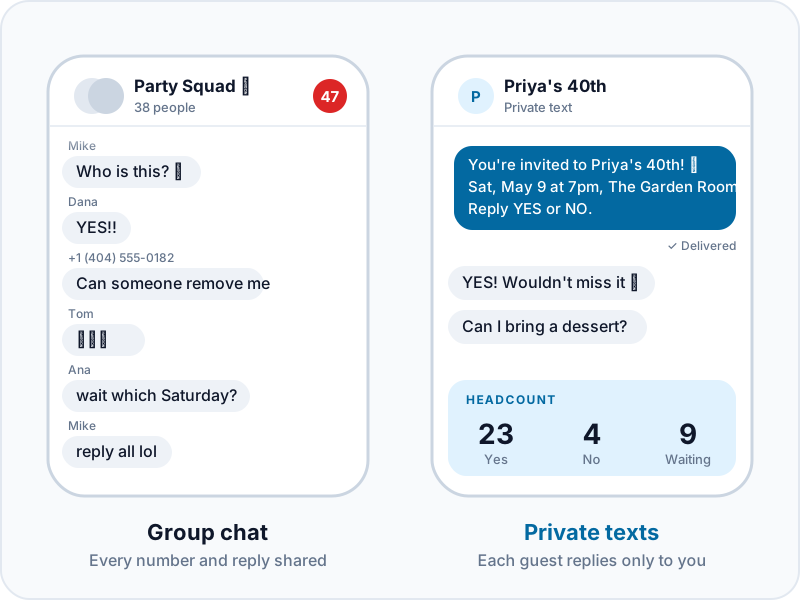
The catch is that you shouldn't send it as one big group text (more on that below). A texting service for events like Text My Event sends the same invitation to everyone as individual, private texts. Each guest replies just to you. Nobody sees anyone else's number, and no 40-person thread starts buzzing.
What makes it work:
- Guests reply YES or NO, and your headcount updates automatically
- Reminders go only to guests who haven't answered, so the people who already replied aren't bothered
- Questions land in one inbox that a co-host can also answer
- Guests don't need an app or an account. It's a regular text
- Thousands of free invitation templates if you want a designed card to go with the text
What it costs: It's a one-time charge per event, with no subscription. Each message counts as one text per guest, so inviting 25 people and sending one reminder uses 50 texts. That fits the $19 plan exactly. Your first event includes 10 free texts so you can test it on your own phone first.
Best for: birthdays, showers, reunions, graduations, holiday parties, and work events. Basically any party where you need a real headcount.
2. Partiful: best for casual parties with friends
Partiful turned the party invite into a shareable event page with a fun, playful design. Guests RSVP on the page and can see who else is going. It's especially popular with people in their 20s and 30s.
Watch out for: guests can usually see who else was invited, which isn't always what you want. Older relatives may also find it less familiar than a plain text.
3. Paperless Post: best for design-forward digital cards
Paperless Post has some of the best-looking digital invitations available, including designer collaborations and an animated envelope that opens on screen. Invitations go out by email or a shareable link, and RSVPs are tracked for you.
Watch out for: it's email-first, so invitations can land in Promotions or spam folders. Premium designs cost extra.
4. Evite: best for classic kids' party invites
Evite has been around for a long time and many parents know how it works. It tracks RSVPs and sends email reminders. The free tier includes ads, and you can pay to remove them.
Watch out for: the same email problem as Paperless Post. Many parents have a whole folder of Evites they never opened.
5. Paper invitations: best for formal and milestone events
For a 50th anniversary, a formal dinner, or a milestone birthday, a printed invitation in the mail still feels special. It's also the only option on this list that ends up on the fridge.
Watch out for: paper is slow and expensive, and RSVP cards don't track themselves. Many hosts mail the invitation as a keepsake, then send a text with the RSVP link. Guests get something to keep and a quick way to answer.
6. Group text from your phone: best for very small groups
For five close friends, a quick group text works fine. Beyond that, it falls apart quickly:
- Everyone sees everyone's phone number
- Every "Yes! 🎉" buzzes every phone in the group
- iPhone and Android users end up in a broken mixed chat
- RSVPs get buried under jokes and GIFs
- Someone always asks to be removed
Text My Event wrote a full guide on running a birthday RSVP without a group chat if you've been burned before.
7. Facebook Events: best for community and public events
Facebook Events still work for neighborhood gatherings, clubs, fundraisers, and events open to friends-of-friends. For private parties, fewer people check Facebook now than a few years ago, and anyone who's left the platform won't see your invite at all.
8. Email: best for work events
Email is fine for office parties and team events, where people already watch their work inbox. For personal parties it's the easiest invitation to miss. If you do use email, send a text the day before as a reminder.
How to send a text invitation the right way

If you go with texts (we'd recommend it), here's how to get the most RSVPs:
- Only text people who expect it. Use phone numbers guests gave you, or share a sign-up link so they can opt in themselves.
- Lead with the important details. What, when, where, then how to reply. Keep the logistics in the first two lines.
- Make replying effortless. "Reply YES or NO" gets more answers than "let me know!"
- Give a deadline. "By Friday" gets replies, while "when you get a chance" gets put off.
- Schedule a reminder. Send a reminder about a week out to the guests who haven't answered. Text My Event has 12 reminder texts you can copy.
- Send a day-of text. Parking, the gate code, or "we're in the backyard" saves a lot of phone calls. Here's how to send a day-of group text without a group chat.
Text invitation templates
Birthday party
You're invited to Priya's 40th! 🎂 Saturday, May 9 at 7pm at The Garden Room. Reply YES or NO by May 1 so we can save you a seat.
Baby shower
Please join us for a baby shower for Ana 💛 Sunday, June 14, 1–4pm at Mia's house (22 Elm St). Reply YES or NO by June 5. Registry: [link]
Game night
Game night at our place Friday at 7! 🎲 Bring a snack to share. Reply YES or NO so we know how many chairs to borrow.
Retirement party
After 32 years, Dave is retiring! 🎉 Join us Thursday, Oct 2 at 5:30pm at Riverside Grill to celebrate. Reply YES or NO by Sept 25.
Holiday party
Our holiday party is back! 🎄 Saturday, Dec 12 from 6pm at our house. Ugly sweaters encouraged. Reply YES or NO by Dec 5.
Family reunion
The Johnson Family Reunion is on! 🌞 July 18–19 at Lake Hartwell Park. Reply YES or NO by June 1. Full schedule: [link]
For the relatives who never check email, Text My Event's guide to reaching relatives who never email is worth a read.
After the party: collect the photos
The invitation is only the first text. The morning after, send a thank-you with a link where guests can add their photos. A ReplayMyDay gallery collects every guest's photos and videos in one place, without an app. You can also print the QR code on a sign at the party so guests can upload while it's happening.
Thank you for coming last night! 🥳 Add your photos here so we can all see them: [link]
Frequently asked questions
Is it rude to send party invitations by text?
Not anymore. For most parties, a text is the most practical invitation, and guests appreciate being able to reply in one tap. For formal events like weddings or milestone anniversaries, consider mailing a printed invitation and using texts for the RSVP and reminders.
How far in advance should I send party invitations?
Send them two to three weeks ahead for most parties, four to six weeks ahead for showers and milestone birthdays, and two to three months ahead for reunions or anything that involves travel. Send a reminder one week before the RSVP deadline.
How do I send a mass text without a group chat?
Use a texting service that sends each guest an individual copy of the message, like Text My Event. Each guest sees a normal one-on-one text from you, and replies come back privately.
What's the best free way to send party invitations?
Partiful and Evite's free tier are the most common free options. If you want texts, Text My Event's first event includes 10 free texts, enough to test the whole flow before you invite anyone.